As of September 2026, Amazon charges an HSA card only for the items it has tagged eligible. Everything else in the cart goes to a second card. The split happens by itself at checkout. Setup is four steps. The declined-card fixes are at the end.
This is the step-by-step version. Add the card. Find the badge. Pay. Save the invoice. Then the two things that trip people up: returns and declines.
What the badge means, and which number to record, is here: what "FSA or HSA eligible" means on Amazon. For a list of what to buy, see the best HSA-eligible items on Amazon.
Before You Start: Which Card
An HSA card is a debit card tied to your HSA balance. Your HSA provider issues it. Fidelity, HealthEquity, Optum, Lively, and HSA Bank all do. If you never received one, log in to your provider and request it.
You do not need the card to use your HSA on Amazon. You can pay with any credit card, keep the receipt, and reimburse yourself from the HSA later. There is no deadline on that reimbursement. The card is a convenience, not a requirement.
The card route is simpler for small orders. The reimburse-yourself route is better for anyone who wants to leave HSA money invested. Both need the same receipt.
Step 1: Add the Card to Amazon
As of September 2026, Amazon's payment help page says it accepts FSA and HSA cards. Eligible items only, U.S. billing addresses only. The card gets added the same way as a credit card.
- ●Go to Your Account.
- ●Open Payment options (amazon.com/wallet).
- ●Click Add a payment method.
- ●Enter the HSA card number, expiration, and the billing address on file with your HSA provider.
Amazon requires a U.S. billing address for these cards. Enter the address your HSA provider has on file. If that address is old, update it with the provider first.
An HSA card is a Visa or Mastercard debit. Amazon treats it like one.
Step 2: Find Items With the Badge
Amazon marks eligible items with an "FSA or HSA eligible" badge on the product page. No badge means Amazon will not charge the HSA card for that item.
Three ways to find badged items:
- ●Filter any search. Run a search, then apply the "FSA or HSA eligible" filter.
- ●Shop the dedicated store. amazon.com/fsa lists only pre-tagged items. First aid, OTC medicine, sunscreen, blood pressure cuffs, glucose monitors, menstrual products.
- ●Check the product page. The badge is on the product page itself, not only in search results.
The badge is Amazon's tag, not an IRS ruling. The IRS rulebook is Publication 502. When the badge and Pub 502 disagree, Pub 502 wins.
Step 3: Pay at Checkout
Select the HSA card as the payment method. For a cart with only badged items, that is the whole step.
For a mixed cart, Amazon needs a second card. Its FSA FAQ says the eligible items get charged to the FSA or HSA card. The rest, including gift wrap, goes to the other payment method. You do not split the order yourself. Amazon does it.
One detail worth knowing:
- ●Shipping and tax on eligible items are included in the eligible charge. That is why the Order Details line says "inc. tax and shipping."
Step 4: Save the Invoice
Amazon does not always include a receipt in the box. Your record lives on the Order Details page.
- ●Go to Your Orders.
- ●Click the order.
- ●Click Invoice.
- ●Print or Save as PDF.
The invoice shows each item's badge. It also shows an Order Summary line: "FSA or HSA eligible (inc. tax and shipping): $X.XX." That line is the number for your records. Not the grand total.
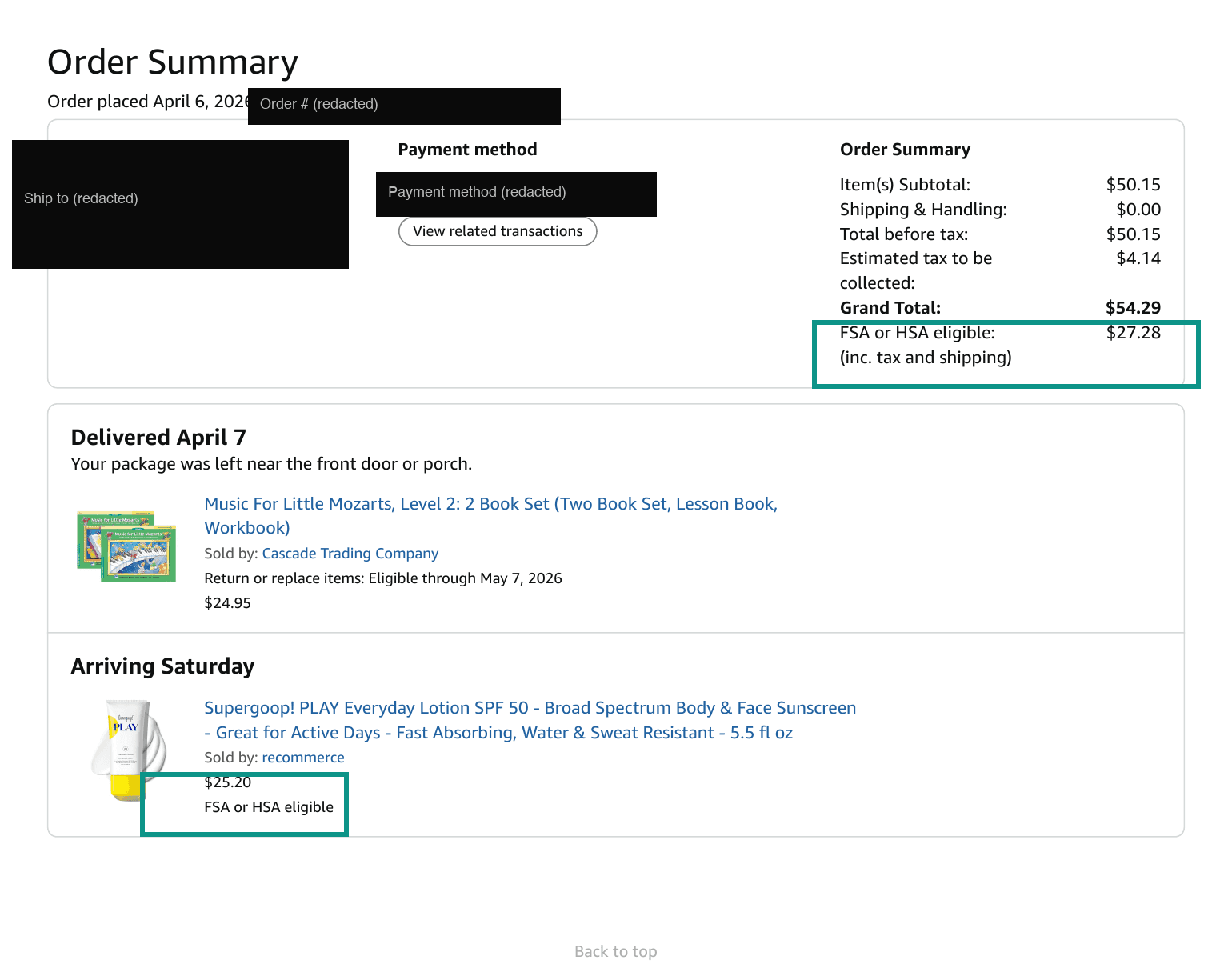
In the order above, the grand total was $54.29. The eligible line was $27.28. The difference was a music book. The $27.28 is the HSA number.
The IRS does not ask for receipts when you file. It asks for them in an audit. Save the PDF the day the order ships. A downloaded copy does not depend on Amazon.
Returns: The Refund Goes Back to the HSA Card
Amazon's return page is clear on this. A refund for an item bought with an FSA or HSA card goes back to that same card. Gift card refunds are not available for those purchases.
That is the correct outcome. The money came from the HSA. It goes back to the HSA. Nothing to report.
Update your records anyway. If you logged the purchase as an HSA expense, mark it returned or delete it. An audit that finds a reimbursed expense with a matching refund is a problem. The refund confirmation email is the record to keep.
Amazon Pharmacy Is a Separate Flow
Prescriptions are always qualified medical expenses. Amazon Pharmacy runs its own checkout with its own rules.
As of September 2026, Amazon's Pharmacy help page covers this. Add the HSA or FSA card in Payment options or at the Pharmacy checkout. One catch: Amazon Pharmacy does not split payment between an HSA/FSA card and another card. One order, one payment method.
The Pharmacy invoice is the receipt. It shows the drug, the fill date, and the amount you paid. Save it the same way.
When the Card Is Declined
Amazon's help page says most declines are insufficient funds. Check the HSA balance first. Contributions post on a payroll schedule, and a fresh card may sit at $0 for weeks.
Other causes:
| Cause | Fix |
|---|---|
| HSA balance is lower than the eligible total | Add funds or pay the difference with a second card |
| Billing address problem | Amazon requires a U.S. billing address. Re-enter the one your HSA provider has on file |
| Cart has an item Amazon did not tag as eligible | Remove it, or add a second card and let Amazon split the charge |
| The seller listed a product without the eligibility tag | Buy from a listing that shows the badge, or pay with a regular card and reimburse yourself |
| HSA provider blocks online merchants | Call the provider. Some restrict card use to pharmacies and clinics |
The universal fallback is the same every time. Pay with a regular card. Save the invoice. Reimburse yourself from the HSA whenever you want. A declined card costs you nothing but a step.
What the Badge Will Not Cover
Two categories rarely get the badge.
Supplements, vitamins, and fitness gear. Publication 502 excludes vitamins and supplements by default. The exception: a practitioner recommends them "as treatment for a specific medical condition diagnosed by a physician." Pub 502 also excludes anything "merely beneficial to general health." A Letter of Medical Necessity is what makes those items eligible. Services like Truemed issue one through a licensed clinician, typically valid for 12 months. There is no confirmed Amazon integration for those letters as of September 2026. Buy the item with a regular card, keep the letter with the receipt, and reimburse yourself.
Third-party seller listings. Some listings do not carry the tag. A bandage is a bandage, and the IRS does not care who sold it. If the badge is missing on a clearly eligible item, the invoice still works as a receipt.
What to Do With the Receipt
The invoice PDF is the proof. The eligible line is the amount. Where it lives is the part people skip.
Tripl is an HSA receipt tracker built for this. Forward the Amazon order confirmation email to receipts@triplapp.com from a linked address, or upload the invoice PDF. Tripl reads the merchant, the date, and the total. It files the receipt under a health category with the image attached. Edit the amount to the eligible line if the order was mixed.
The receipt is stored in the cloud. Connect Google Drive or Dropbox and it mirrors to your own account too. Two copies, two places. An Amazon account closure or a lost phone does not take the record with it.
Tripl is $30 per year for the first 100 sign-ups. After that, $50 a year.
Quick Reference: What Amazon Tags as Eligible
| Category | Badge? | Why |
|---|---|---|
| OTC medicine (pain, allergy, cold, antacid) | Yes | Prescription requirement removed by the CARES Act in 2020 |
| Menstrual care products | Yes | Treated as medical care under IRC §223(d)(2)(A) |
| First aid, bandages, thermometers | Yes | Medical supplies |
| Sunscreen, broad-spectrum SPF 15+ | Yes | Amazon tags it; keep the product page for your records |
| Blood pressure cuffs, glucose monitors | Yes | Diagnostic devices |
| Reading glasses, contact lens solution | Yes | Vision care |
| Vitamins and supplements | No | Pub 502 excludes them without a practitioner's recommendation for a diagnosed condition |
| Fitness trackers, massage guns, gym gear | No | "Merely beneficial to general health" without an LMN |
| Toothpaste, deodorant, cosmetics | No | Personal-use items |
| Groceries, books, electronics | No | Not medical care |
OTC medicine (pain, allergy, cold, antacid)
- Badge?
- Yes
- Why
- Prescription requirement removed by the CARES Act in 2020
Menstrual care products
- Badge?
- Yes
- Why
- Treated as medical care under IRC §223(d)(2)(A)
First aid, bandages, thermometers
- Badge?
- Yes
- Why
- Medical supplies
Sunscreen, broad-spectrum SPF 15+
- Badge?
- Yes
- Why
- Amazon tags it; keep the product page for your records
Blood pressure cuffs, glucose monitors
- Badge?
- Yes
- Why
- Diagnostic devices
Reading glasses, contact lens solution
- Badge?
- Yes
- Why
- Vision care
Vitamins and supplements
- Badge?
- No
- Why
- Pub 502 excludes them without a practitioner's recommendation for a diagnosed condition
Fitness trackers, massage guns, gym gear
- Badge?
- No
- Why
- "Merely beneficial to general health" without an LMN
Toothpaste, deodorant, cosmetics
- Badge?
- No
- Why
- Personal-use items
Groceries, books, electronics
- Badge?
- No
- Why
- Not medical care
More on Amazon and HSAs
- ●What "FSA or HSA Eligible" Means on Amazon (and How to Pay)
- ●The Best HSA-Eligible Items on Amazon
- ●How to Tell If a Receipt Is HSA-Eligible
- ●The Complete HSA-Eligible Expenses List
*This is educational content, not financial or tax advice. Consult a qualified professional before making decisions about your HSA.*